This discussion has been locked.
You can no longer post new replies to this discussion. If you have a question you can start a new discussion

Keep loosing sync / pairing and having to re-pair

twice now in the last week or so the ISM has failed to connect / sync to Connect (on iOS). It seems like the ISM has completely reset itself or something.

I end up having to remove it from Connect and re-add it, then it'll work again, but lost that nights sleep data.

Not sure if this is related, but it will seemingly randomly buzz 15-30 mins after putting it on some nights. I don't have any alarms set.

Any ideas what's going on, or how to fix it?

  •  - I understand your frustrations. To clarify, does your ISM show as connected to the phone but not the Connect app?  Or, does it show as disconnected from both?

    As DoctorCool mentioned, are you removing any paired watches watch before using the ISM?

    You'll also want to be sure that the Connect app, your phone's OS, and ISM are all up to date. More info on updating the ISM here.

    Thanks for your reply.

    To be honest, I’m quite disappointed by both the response and the response time.

    This thread was opened almost two months ago, and after waiting this long, the first official reply is a generic troubleshooting checklist. It feels like my original post wasn’t fully read, because most of the questions you asked were already answered there.

    • The ISM firmware is up to date.
    • Garmin Connect and my phone are up to date.
    • I already followed the recommended pairing procedure.
    • I also removed my paired watch before using the ISM.

    Despite all of this, the issue still persists exactly as described in my original post.

    I spent a considerable amount of time documenting the problem in detail because it appears to be a reproducible firmware/software issue. After almost two months, I had hoped someone would review the symptoms I reported rather than ask me to repeat the standard troubleshooting steps.

    Could you please review my original post and let me know whether this issue has been reproduced internally or escalated to the engineering team? If additional logs or diagnostics are required, I’m happy to provide them.

    Again, there has been no response, and my thread was merged into another thread without any communication or notice. At first, it looked as if my thread had simply been deleted.

    Could someone please explain why this was done without informing me? A short note indicating that the thread had been merged would have avoided a lot of confusion.

  •   and  - I have sent each of you an email requesting some additional information so we can investigate your specific experiences further. 

    If anyone else is experiencing similar symptoms, please comment below with:

    • Date(s) of the occurrence
    • Whether sleep data was missing
    • Whether the device required re-pairing or showed as disconnected
    • Phone model
    • Phone OS version
    • Garmin Connect app version
    • Whether the behavior occurs consistently or intermittently

    Any additional details regarding what happened immediately before or after the issue occurred may also be helpful.

    We appreciate your help as we continue reviewing these reports.

  • Happend to me yesterday when I put the band on to sleep

    Took me over 30 minutes to reset it by tapping 15 times and pair it again with my phone. Phone found it I connect app but go failed to pair every time

    • Date(s) of the occurrence :  today 31/7 
    • Whether sleep data was missing- : No Band did not pair with phone to sync, Always sync before I sleep
    • Whether the device required re-pairing or showed as disconnected, Yes requered reset and re-pari
    • Phone model : Iphone 17
    • Phone OS version : IOS 26.6
    • Garmin Connect app version : Latest available from app store
    • Whether the behavior occurs consistently or intermittently, 2-3 times since I bought it year a ago
  • Happens for me too. I purchased the ISM right when it launched in Europe. It happens about once every 2–3 months after a night's sleep and always results in the loss of that night's data. It happened again today. This means the data from August 1 through August 2 is lost. It's always the same thing. The ISM won't connect to the iPhone via Bluetooth anymore. Not in the app, and not in the Bluetooth settings either.
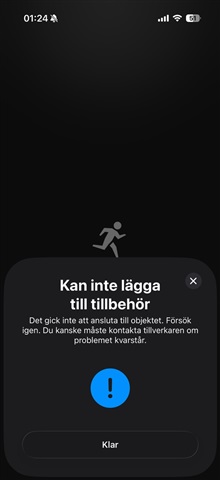
    I always have to remove the ISM from the Garmin Connect app and from the iPhone’s Bluetooth settings. The intended method in the Garmin Connect app > going to Garmin-Devices > Add Device > does find the ISM, but it always fails to connect it. After the error dialog appears, I always have to select the ISM manually. That makes the addition work. My wife's ISM had this problem twice as well, and it's been sitting in the drawer ever since.

    # Date(s) of the occurrence: About once every 2–3 months. Most recently on August 1 to August 2
    # Whether sleep data was missing: Yes, the sleep data is missing every time after that
    # Whether the device required re-pairing or showed as disconnected: Early in the morning, it always shows up as disconnected. I have to reconnect the ISM every time.
    # Phone model: iPhone 13
    # Phone OS version: Always up-to-date: atm: iOS 26.6
    # Garmin Connect app version: always up-to-date: atm: 5.27.1 since July 30.
    # Whether the behavior occurs consistently or intermittently: Right from the start. I bought the ISM when it was released in Germany. It happened once after just a few weeks, and then about every 1–2 months. Sometimes, though, it happens more often, and sometimes it works for longer without any problems.

    Losing a night's worth of data is certainly very frustrating, but the process of reconnecting to the ISM is incredibly annoying. A stable solution would be very helpful.

    Best regards

  • Please add me to the same issue.  Loosing sync randomly for a couple of days here and there 

  • To answer the following;

    - I’ve been noticing this over the last couple of months.  Every 4-6 weeks completely looses syncing and all HRV / sleep data. Will not re sync until repaired as a new device. 
    - it loses the odd days data over the 4-6 weeks the will completely stop working. 
    - as above unpair/ repair but this is totally unacceptable and unreliable. 
    - yes purple flash

    -iPhone 15pro. 

    please advise on any fix.  I am very invested in the Garmin ecosystem but TBH if this is not sorted fairly quickly will be switching to whoop for recovery metrics. I rely on my HRV for training and can’t be loosing data all the time 

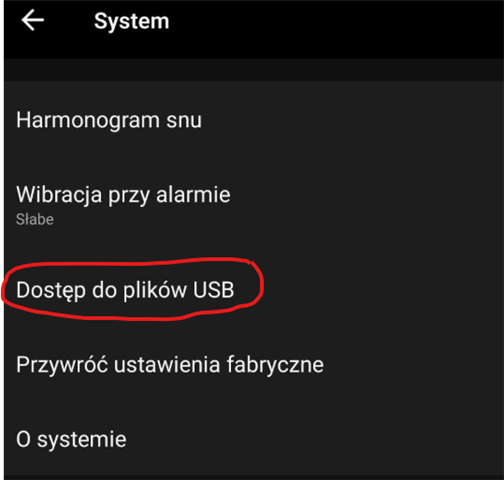
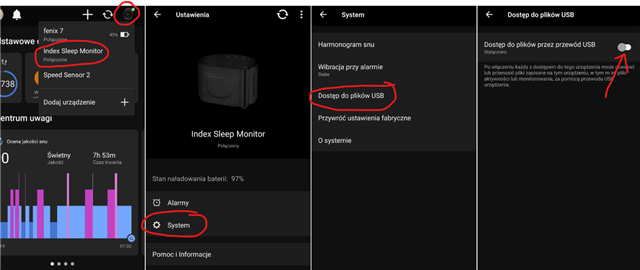
  • Try disabling USB file access. That fixed it for me — it's been working flawlessly for 3 weeks now without losing any overnight data. Best regards!

  • How to access this?


  • Here's a preview in the screenshots below.