SW 32.20 change of Routing Mode not saved

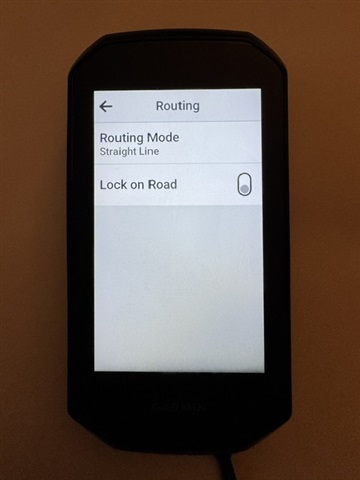
When I edit an activity profile and change the Routing Mode in "Navigation / Routing", for example to "Straight Line", this change is not saved permanently. After exiting the menu and re-entering it, the Routing Mode is reset to the default from the template from which the profile has been created. 

I have that issue since upgrade to SW 32.20. Tried multiple device resets but behaviour still the same. Same issue also when changing the Routing Mode in Connect app.

  • Thanks for the post,  . Does it do this with all activity profiles or just particular ones? Can you please let us know which you've tried so we can try recreating it in house?

  • I have tried all available templates:


    Road
    Mountain
    Indoor
    Gravel
    Cyclocross
    Commute
    Tour
    Ebike
    Emountain
    Enduro MTB
    E-Enduro MTB
    Downhill MTB

    The problem is with all of them. Not a single one where switching the routing mode worked. 

    Also creating a profile through "Copy Existing" makes no difference - same problem. 

    It also didn't matter which routing mode I chose, it's never permanently stored.
    I especially miss "Straight Line" Routing mode, because this mode is not available with any default template

  • Thank you for those additional details,  . I just sent you an email to gather some additional information regarding this behavior we can investigate further.

    For anyone else experiencing this on an Edge 1050, please comment with:

    • The software version currently installed on your Edge 1050.
    • Whether the behavior occurs when changing the Routing Mode directly on the device, through the Garmin Connect app, or both.
    • Approximately when you first noticed the behavior.
    • Any additional details that may help us better understand what you're experiencing.

    That will help us evaluate the reports and determine the scope of the issue. **

  • I’m also experiencing the same problems. I‘ve only ever had and used one profile. I noticed this past week that my preferred Routing Mode is not saving either - I change it to Mixed Surface Cycling but it always defaults back to Road Cycling. This really pi**es me off cos now when I’m cycling on canal paths and asking it to navigate me to a location further down the canal - it keeps telling me to make a u-turn to get onto a road, rather than guide me along the canal. 

    I often wish I just got a Wahoo. This is my first bike computer and it annoys the heck out of me that almost every time you guys release a firmware ‘update’ you brick something. I’m a software dev myself but i cannot sympathise given how poor your testing is. 

    Software Version: 32.20
    Same behaviour when changing on device and also through Garmin Connect

    I paid like £600 for my 1050. The most premium device where the users are always the beta testers, and having to put up with things not working. 

  • , thank you for letting us know that you're seeing the same behavior. We've been able to verify reports where the Routing Mode setting within an activity profile is not being retained on Edge 1050 devices running software version 32.20. I've added your experience to the ticket regarding this concern.

    As a possible workaround, try creating a new activity profile using the template that corresponds to the Routing Mode you'd like to use. In some cases, this allows the desired Routing Mode to be applied through that profile rather than changing the Routing Mode setting within an existing profile.

    For anyone else experiencing this, please be sure to bookmark this thread. We will share any meaningful updates here as they become available.

  • I just tested it, and my Edge 1050 has the same issue. Since version 32.20, I also experience an immediate crash whenever I edit the data field of a Connect IQ app.

  • When I edit an activity profile and change the Routing Mode in "Navigation / Routing", for example to "Straight Line", this change is not saved permanently. After exiting the menu and re-entering it, the Routing Mode is reset to the default from the template from which the profile has been created.

    I'm not sure if I've understood this thread correctly, especially since I can't find the “mixed surface cycling” routing mode, and problems editing IQ data fields probably have nothing to do with the routing mode.
    In any case, I tried to reproduce the problem on my Edge 1050.
    However, I can’t reproduce the problem.

    For the test I used my “KTM bike” profile, which is set to „Mountain Bike“ and to the “Mountain Biking” routing mode.

    -I have set Routing Mode under Navigation to Straight Line.
    -left the menu, went back to home screen, went one more time to Navigation - Routing Mode: Straight line remains as setting.
    -on the map screen I tapped a location to ride 
    -pressed Ride

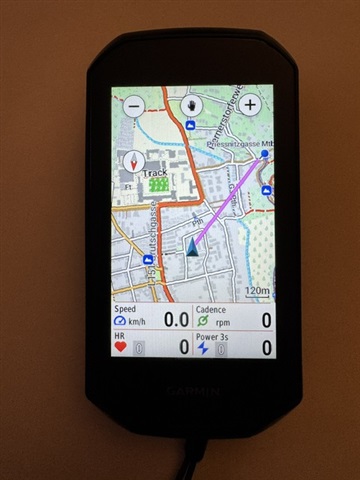
    Got a straight line navigation line from current location to selected location.


    But - as mentioned - mybe I got the thread wrong…

    In any case, “Straight Line” remains in my navigation settings until I reset it back to “Mountain Biking.”

  • …did another test:

    -tapped a location on the map screen
    -saved this location named „Ser“
    -from the home screen I tapped Navigation - to a saved location
    -Straight line still is set
    -Ride

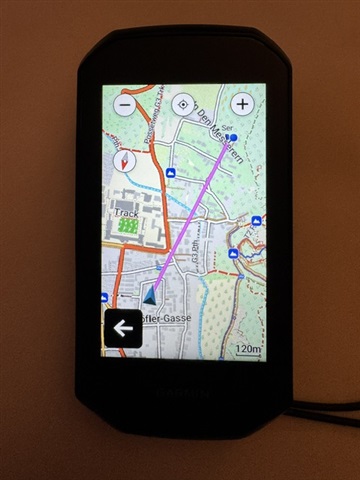
    Got the strait line to the desired stored location.

    In my opinion, straight-line navigation can only be from a starting point to an endpoint.
    Loading a route doesn't make sense for this type of navigation. Which of the many points would the straight line then be drawn to?

    PS: Yes, it sucks that even with turn by turn disabled, for each new course a calculation is made…

  • That's different from what happens on my device. I was in contact with Garmin support and they were able to reproduce the problem.
    Are you running sw 32.20? 

    Regarding straight line navigation as such:
    For a planned route, I would expect to be navigated straight line from one point to the other, even if there are no roads on the map. That was working perfectly in (most) previous sw versions but is now broke in sw 32.20. 

  • Sorry - forgot to mention:
    software 33.13 beta