This discussion has been locked.
You can no longer post new replies to this discussion. If you have a question you can start a new discussion

GPS Accuracy

Former Member
Former Member

I am wondering the F6 performance dips when the battery is low. I have a 14 hours left and did a run. The GPS route is terrible. It has been through ponds and shrinks the run down massively. The black line is the route. I have the google gps  map too and it's no better. 
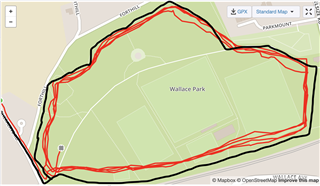
Is the overall distance based on the gps data as my 4 laps are quite a bit shorter than the reality. Is anyone else having gps issues? 

I really felt the F6 was the ultimate outdoor watch but I am a disappointed at the minute, especially given the investment. 

  • What are your GPS settings? It kind of looks like you have Smart Recording turned on, instead of 1-second recording.

  • Former Member
    0 Former Member in reply to C.sco

    GPS Settings are GPS and Glonass, I am not sure where I find the smart recording option?

  • I am not sure where I find the smart recording option?

    Ya that's probably the problem, then. The default setting is Smart Recording, which means that's almost for sure what yours is set to still. It truncates your GPS track data to (what Garmin considers to be) the bare minimum, which usually results in lots of cut corners.

    Hold Menu button, select System, then select Data Recording.

    Also try GPS-only, or galileo if you're still having issues.

  • Former Member
    0 Former Member in reply to C.sco

    Agh, so it's not an issue with the watch? this is great news. Will this impact on battery much? This run was dreadful for cut offs and me running through ponds etc. 

  • Former Member
    0 Former Member in reply to C.sco

    ps thank you. 

  • Zero impact on battery. The only reason for Smart Recording is to save storage space (it reduces the file size of the recorded activity). Assuming you have a Pro/Sapphire watch, storage space is of no concern. It's only a problem on the base-model watches that have a lot less storage.

  • Former Member
    0 Former Member in reply to C.sco

    Thank you, this is great, really appreciated. I am syncing over wifi as Bluetooth isn't working properly on iPhone so file size isn't too much of a worry. 

    You have made my night, thanks

    David

  • One other thing - try to open the activity a few minutes before you start, to let the watch gather as much GPS data as it can before you begin. That seems to help with accuracy. I make a habit of opening my activity (hike, run, etc) as soon as I step outside, to give it 5-10 minutes to fully connect with as many satellites as possible before I press the start button and begin.

    Your watch will give you the green checkmark ("ok to begin") as soon as it syncs with as few as 4 satellites... but accuracy won't be great. If you give it a few more minutes to sync with a more satellites, accuracy will be better.

  • Former Member
    0 Former Member in reply to C.sco

    Thanks, I wait for the green bar but was shocked to see the maps tonight. Is distance set on the GPS data? I will have ran a fair bit more tonight if it is :) 

  • Distance calculation is based on GPS data, yes, but the distance recorded for your activity will be the same regardless of the Smart/1-second recording setting. If the distance number is wrong, then that can only be caused by GPS signal accuracy issues - the tip about waiting a few minutes after getting the green bar should help - if not, try GPS+Galileo or GPS-only and see if it improves.