This discussion has been locked.
You can no longer post new replies to this discussion. If you have a question you can start a new discussion

How to change the colour of 'navigation/course follow line' with your own map theme!

As I've posted in this thread, by , the navigation line in my watch changed sometime in the middle of Sept. to a much thinner one that I've trouble seeing with most of my maps: https://forums.garmin.com/outdoor-recreation/outdoor-recreation/f/fenix-6-series/194034/how-to-change-the-colour-of-the-navigation-line

Contacted support, but they didn't have an answer.

I started to test what possibilities with the map theme files and found out that this style field="MPM_ACTV_CRS_CLR" is used for the navigation line.
If you create different map theme files with different colours, you can even change the colour while running depending on the map background.

Create a text file and save with extension 'kmtf' to the map theme folder on watch.

This text give you a dark green line with dark green borders.

<?xml version="1.0" encoding="UTF-8"?>
<garmin_map_theme>
	<metadata>
		<title>DarkGreen</title>
		<description>DarkGreen</description>
	</metadata>
	<stylelist>
		<style field="MPM_ACTV_CRS_CLR">
			<color>
				<primary day="#ff006400" night="#ff006400"/>
				<secondary day="#ff006400" night="#ff006400"/>
			</color>
		</style>
	</stylelist>
</garmin_map_theme>

Great color code page: http://www.farb-tabelle.de/en/table-of-color.htm

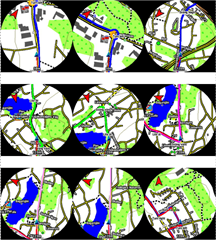
Some examples: Blue, green, magenta and the last-right one are red with blue borders.
The two bottom-left is the thin original that shows up if no theme is used.
  • Thanks for this.

    I just tried navigation, and went in the wrong direction due to the track not easily identifiable.

    (Was using popularity map)

    Have you played around with the in-built themes (ie Popularity) to see if you can change the course line in these?

  • Thanks for the themes.  Similar colors between Navigation and other streets were driving me nuts while running.  Hard to pick out the direction I'm suppose to go when the course course and side street colors are the same.  Going to try out a custom theme.

  • How hard it would be to clone and tweak an existing map theme, for example High Contrast theme? I want to make it even more high contrast. 

  • I never found a spec for all style fields. Even though you can guess based on the abbreviations, it's a time consuming trial and error to get it as you want to. On the other hand, the colours are no problem.

  • Thanks! I am going to try. I am going to change only a few things, for example change light green background to white (light green reduces contrast) or change the color used for trails from red to black, etc. Some of these should be possible to guess based on their color. 

    Currently dashed red lines don't look very distinct on light green background. And grey forest roads look even worse on light green. 

  • Another way to get map signs to be more clearly visible is to work with the TYP-file inside of the Garmin map file (IMG-file).

    If you look at my screenshots above, you can see that the small paths and roads are rather thick. That's from a changed TYP-file.

  • How did you get the orange arrow?

  • Did you manage to get a thinner line? I cannot remove the borders.

  • Nothing special.  I guess just one of the default Fenix themes.  I did switch to an Orange custom theme that I grabbed from the link above in this thread and the guidance visibility is tons better.  The new theme shows a blue arrow with the orange navigation color:

  • Thanks for the hint. Now I got an orange arrow as used in the 'Dark' theme:

    <style field="MPM_VEHICLE_LEFT_CLR">
    <color>
    <primary day="#ffff5500" night="#ffff5500" />
    <secondary day="#00ffffff" night="#00ffffff" />
    </color>
    </style>
    <style field="MPM_VEHICLE_RGHT_CLR">
    <color>
    <primary day="#ffff5500" night="#ffff5500" />
    <secondary day="#00ffffff" night="#00ffffff" />
    </color>
    </style>
    <style field="MPM_VEHICLE_BACK_CLR">
    <color>
    <primary day="#ffff5500" night="#ffff5500" />
    <secondary day="#00ffffff" night="#00ffffff" />
    </color>
    </style>

    But I'm still trying to remove the navigation line borders.